When a Saudi family enrolls their daughter in an online English class, they are doing two things simultaneously: choosing an educational programme and granting an unknown adult one-on-one access to their child in a private digital setting. The educational question gets most of the attention during the selection process. The safety question deserves equal care.
One-on-one online tutoring is structurally different from a school classroom. There is no other teacher present, no other children watching, and often no parent in the room. The session happens on a screen, in the child’s home, with a teacher the family has never met in person. For daughters specifically, Saudi parents have additional expectations about privacy, gender, and appropriate conduct that are not automatically met by a platform’s general safety assurances.
This guide covers the eight specific privacy and safety settings parents should verify before their daughter attends a first session on any online English platform. It explains what each setting is, what a strong policy looks like, what a weak or absent one looks like, and what to do if a concern arises. It also includes a platform comparison table, a parent action checklist, and a section on what to confirm specifically with 51Talk. The goal is to give Saudi parents a complete safety framework that they can apply to any platform, verified in writing before the first class begins.
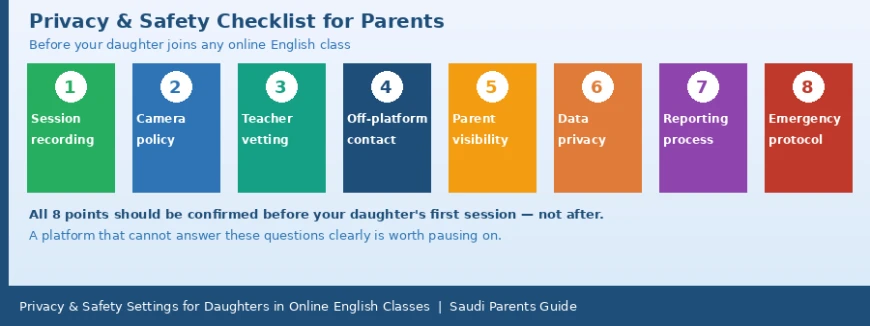
Why Safety Requires Explicit Verification, Not Just Trust
Reputable online English platforms do have safety systems. The problem is that those systems vary significantly in their specificity, their enforceability, and how clearly they are communicated to parents. A platform that says it is committed to child safety has made a statement. A platform that can describe its session recording policy, its off-platform contact prohibition, its teacher background check process, and its incident reporting timeline has provided information parents can act on.
The difference matters for daughters in particular. In a Saudi context, the expectations around a young woman’s privacy, the appropriateness of her interactions with adult men, and the oversight of those interactions are specific and serious. A generic child safety policy written for a global audience may not address those expectations at the level of detail a Saudi parent needs.
Asking the eight questions in this guide before the first session takes roughly twenty minutes. It creates a written record of the platform’s commitments. And it means that if a concern arises, the parent already knows the reporting process, has the relevant contact information saved, and does not have to navigate an unfamiliar system under pressure.
The 8 Privacy and Safety Points
Point 1: Session recording
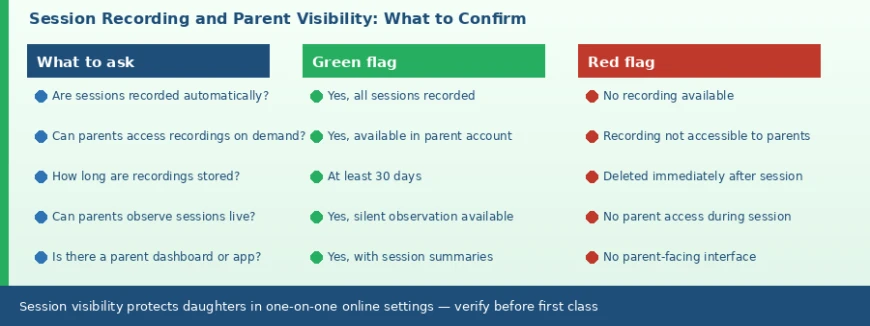
Whether sessions are recorded and whether parents can access those recordings is the single most important safety mechanism for a child in a one-on-one online setting. A parent who is not present during the session has no direct visibility into what happens unless a recording is available. Platforms that record all sessions and make them accessible to parents in a parent account provide a safety layer that unrecorded sessions cannot.
What to ask: Are all sessions recorded automatically? Can I access my daughter’s session recordings through my parent account? How long are recordings stored before deletion? Is there a live observation mode where I can watch the session in progress?
Strong policy: All sessions recorded, accessible in parent account, stored for at least 30 days, with a live silent observation option.
Weak policy: Sessions not recorded, or recordings accessible only to the platform with no parent access.
Point 2: Camera and image policy
Some platforms require the child to have their camera on throughout the session. For Saudi families, this may not be acceptable, particularly for older girls or in households where other family members may be in the background. Understanding the camera policy before the first session avoids a conflict during it.
What to ask: Is the child required to have their camera on? Can parents disable the child’s camera while keeping the teacher’s camera active? Is there a privacy screen or virtual background option if the camera must be on? Are session images or screenshots taken by the platform for any purpose?
Strong policy: Camera is optional for the child; parents can configure camera settings in the account; no screenshots taken without explicit consent.
Weak policy: Camera required at all times with no opt-out; or no stated camera policy at all.
Point 3: Teacher background vetting
How a platform verifies teacher identity and conduct history before hiring determines the baseline quality of the teacher pool. A platform that can describe its vetting process in specific terms, what documents are required, whether background checks are conducted, whether there is a supervised trial period, is more accountable than one that offers a general assurance.
What to ask: What verification steps does the platform take before a teacher is approved to teach? Is a criminal background check or equivalent conducted? Are teaching qualifications verified against the issuing institution? Is there a probationary or monitored period for new teachers?
Strong policy: Background checks conducted; qualifications verified with issuing institution; new teachers observed during a trial period before teaching independently.
Weak policy: General statement that teachers are qualified and experienced with no described verification process.
Point 4: Off-platform contact prohibition
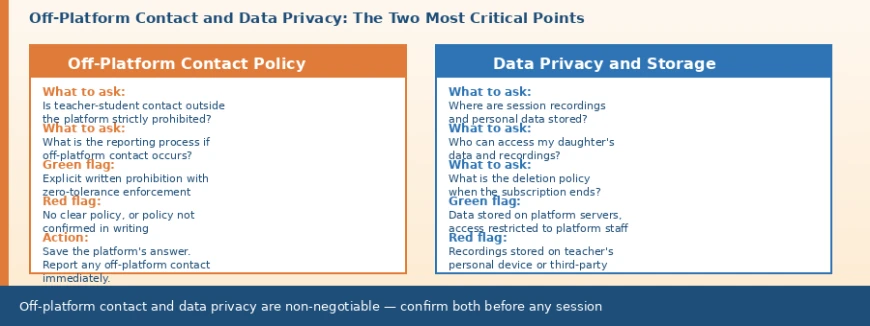
Any contact between a teacher and a child outside the platform, whether through WhatsApp, Instagram, email, or any other channel, is a serious safety concern. Reputable platforms prohibit this explicitly and treat any violation as grounds for immediate teacher removal. The prohibition needs to be in writing, communicated to teachers as a condition of employment, and backed by a reporting mechanism that parents know how to use.
What to ask: Is there a written policy explicitly prohibiting teacher-student contact outside the platform? What happens to a teacher who violates this policy? How does a parent report off-platform contact if it occurs? Is the prohibition confirmed in the platform’s terms of service in a form that is enforceable?
Strong policy: Explicit written prohibition with immediate termination as the stated consequence; named reporting channel with a committed response time.
Weak policy: No explicit policy, or a general code of conduct that does not specifically address off-platform contact.
Point 5: Parent observation access
The ability for a parent to observe a session in progress, silently, without interrupting the teacher or the child, is a valuable safety mechanism and also a useful quality check. Not all platforms offer this, but those that do give parents a level of ongoing visibility that cannot be replicated by recordings alone, because a parent watching a session can stop it if something concerns them.
What to ask: Is there a silent observation mode where I can watch my daughter’s session without the teacher or child knowing I have joined? Is there a parent dashboard that shows session summaries, teacher feedback, and activity logs? Can I receive a notification when a session begins or ends?
Strong policy: Silent observation available via parent account; dashboard with session summaries and feedback; notifications on session start and end.
Weak policy: No parent access to sessions in progress; no dashboard; no notifications.
Point 6: Data privacy and storage
A child enrolled in an online English class generates personal data: name, age, location, session recordings, and potentially images and voice recordings. Saudi families have legitimate expectations about how this data is handled. Session recordings in particular should be stored on the platform’s own servers, not on the teacher’s personal devices, and there should be a clear policy on who can access them and when they are deleted.
What to ask: Where are session recordings stored, on platform servers or on the teacher’s personal device? Who within the platform has access to session recordings? Is the data stored in compliance with relevant data protection regulations? What happens to my daughter’s data and recordings when the subscription ends?
Strong policy: Recordings stored on platform servers; access restricted to authorised platform staff; clear deletion policy on subscription cancellation; data handling compliant with applicable regulations.
Weak policy: Recordings stored on teacher’s device; no stated access restrictions; no deletion policy; no stated compliance framework.
Point 7: Incident reporting process
Knowing the reporting process before a concern arises means a parent can act immediately rather than searching for the right contact while upset or under time pressure. The reporting process should include a named channel, a committed response time, and an escalation path if the initial response is unsatisfactory. A general contact form with no committed timeline is not a reporting process in any meaningful sense.
What to ask: What is the specific channel for reporting a concern about a teacher’s behaviour? What is the platform’s committed response time for a safety report? What is the escalation process if the initial response is unsatisfactory? Is there a dedicated child safety team or responsible person at the platform?
Strong policy: Named reporting channel, committed response time within 24 hours, named escalation path, dedicated child safety contact.
Weak policy: General customer service contact with no committed timeline and no stated escalation process.
Point 8: Emergency and session termination protocol
If something concerning happens during a session, a parent needs to be able to end it immediately. Platforms that allow parents to terminate a session remotely, or that have a mechanism for the child to end the session without teacher consent, provide a safety layer that passive recording alone does not. This is particularly relevant for young children who may not know how to close the application themselves.
What to ask: Can a parent terminate a session remotely if a concern arises? Can the child end the session without teacher consent? Does the platform have any mechanism for detecting and flagging inappropriate session content? Is the parent notified if a session ends unexpectedly?
Strong policy: Parent can terminate sessions via the dashboard; child can exit the session at any time; unexpected session endings trigger a parent notification.
Weak policy: No remote session termination; child cannot exit independently; no notifications for unexpected endings.
The 8-Point Checklist at a Glance
Use this table before enrolling your daughter in any online English platform. Ask each question, save the answer in writing, and use the green and red flag indicators to assess the platform’s response.
| # | Safety point | What to ask or verify | Green flag | Red flag | | 1 | Session recording | Are sessions recorded automatically? Can parents access the recordings? | All sessions recorded; accessible in parent account for 30+ days | No recording; or recordings not accessible to parents | | 2 | Camera and image policy | Is the child required to be on camera? Can parents disable video if preferred? | Camera is optional; parents can restrict video access if needed | Camera required; no opt-out for families who prefer privacy | | 3 | Teacher background vetting | What verification steps are taken before a teacher is hired? Background check, qualification check? | Specific process described: DBS/background check, qualification verification, trial assessment | Vague general assurance with no specific steps described | | 4 | Off-platform contact prohibition | Is teacher-to-student contact outside the platform explicitly prohibited in writing? | Written policy with zero-tolerance enforcement; reporting mechanism provided | No explicit policy, or policy is general and unenforceable | | 5 | Parent observation access | Can parents observe sessions live, silently? Is there a parent dashboard or observation mode? | Silent observation available; parent dashboard with session summaries | No parent access during sessions; no dashboard | | 6 | Data privacy and storage | Where is session data stored? Who can access it? What is the deletion policy when subscription ends? | Data on platform servers; restricted access; clear deletion policy on cancellation | Data on teacher’s personal devices; or no clear privacy policy available | | 7 | Incident reporting process | How do parents report a concern about teacher behaviour? What is the response time? | Named reporting channel; committed response time; escalation path described | Only a general contact form with no committed response time or escalation | | 8 | Emergency and escalation protocol | If a serious safety concern arises during a session, what is the immediate action process? | Platform can terminate a session remotely; parent is notified immediately | No described emergency protocol; parent must act independently |
What to Do If a Safety Concern Arises
Even with strong platform policies in place, concerns can arise. Knowing what to do before a concern occurs means you can act quickly and effectively rather than reacting under pressure.
Off-platform contact
If you discover that a teacher has contacted your daughter outside the platform, whether through a message, a friend request, or any other channel, treat it as serious and act immediately. Do not wait to see if it happens again. Collect any evidence of the contact and include it in a report to the platform using the formal reporting channel you identified before enrolment. Request written confirmation from the platform that the teacher has been removed from your daughter’s account and that the matter is under review. If the platform’s response is inadequate or slow, escalate to the platform’s management. In Saudi Arabia, concerns about inappropriate contact between an adult and a child can also be reported to the relevant authorities.
Uncomfortable or inappropriate session content
If your daughter describes a session as making her uncomfortable, take it seriously even if the specific concern seems minor. Ask her specific, open questions rather than yes/no ones: what did the teacher say, how did it make her feel, has anything like that happened before. Review the session recording if it is available. If what you find is concerning, report it through the platform’s formal channel with the recording as evidence. If the session recording is not available, document your daughter’s account in writing and include it in the report.
No response from the platform
If the platform does not respond to a safety report within the committed timeframe, send a follow-up through the same channel with a clear statement that you expect a response by a specific date. If that follow-up is also ignored, escalate in writing to the platform’s leadership, copy the correspondence, and consider whether continued enrolment is appropriate while the matter is unresolved. A platform that does not respond to a child safety report is not a platform that has taken safety seriously in practice, regardless of what its policies say.
Platform Comparison: Safety Features by Platform Type
This table compares the safety-related features of three common platform types. The answers in the one-on-one column are what reputable platforms should be able to provide; verify each one directly rather than assuming it applies.
| Safety feature | One-on-one live (e.g. 51Talk) | Group class | On-demand tutoring |
| Session recording available | Ask platform directly | Rarely | Rarely |
| Parent can observe sessions | Ask platform directly | Limited | No |
| Off-platform contact policy | Ask platform directly | School policy varies | Platform-dependent |
| Teacher background vetting | Described by reputable platforms | School-level process | Varies widely |
| Parent dashboard access | Ask platform directly | School portal only | No standard |
| Incident reporting process | Named channel (reputable platforms) | School process | Platform-dependent |
| Data privacy policy | Available on request | Institution policy | Check individually |
| Female teacher option | Ask platform directly | Depends on school | Browse by profile |
What to Confirm with 51Talk on Privacy and Safety
51Talk is the platform most Saudi parents in this context are actively evaluating. The following covers what to verify directly with the platform across the eight safety points, and what 51Talk’s structure enables at the platform level.
What 51Talk is
51Talk is a live one-on-one English platform for children. Sessions are 25 minutes, delivered by qualified teachers, structured around CEFR levels and Cambridge English learning goals. The lesson cycle includes a pre-class warm-up, the live session with real-time correction, post-class review exercises targeted to session content, a written teacher feedback report, and regular level assessments.
Safety points to verify directly
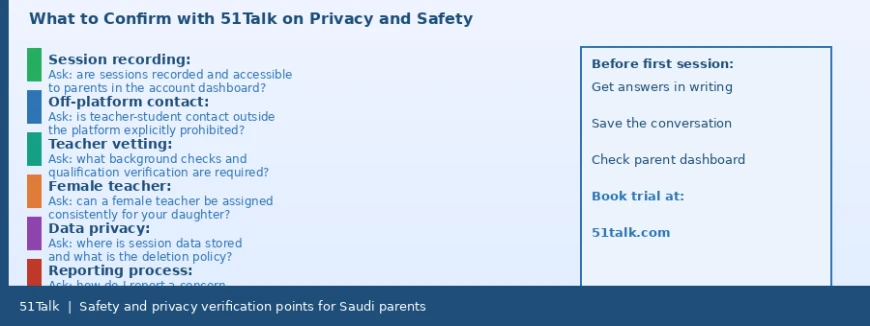
• Session recording. Ask whether sessions are recorded and whether parent accounts include access to recordings. This is the most critical safety question and the answer should be confirmed before the trial lesson.
• Off-platform contact policy. Ask specifically whether there is a written prohibition on teacher-student contact outside the platform and what the consequence is for a teacher who violates it. Ask for the reporting channel for this type of concern.
• Teacher vetting process. Ask what background checks and qualification verification steps are required before a teacher is approved. A specific answer, not a general assurance, is what you are looking for.
• Female teacher assignment. Ask whether a female teacher can be specifically and consistently assigned to your daughter’s account across all sessions, including when the primary teacher is unavailable.
• Data privacy. Ask where session recordings are stored, who can access them, and what the deletion policy is when the subscription ends. Ask whether there is a published privacy policy covering child data.
• Incident reporting. Ask for the specific channel and the committed response time for a child safety report. Save this information before the first session, not after.
A trial lesson is available at 51talk.com. Use it to verify both the educational quality and the platform’s communication about safety. A platform that answers safety questions promptly and specifically during the pre-booking process is one that has taken those questions seriously.
Parent Action Checklist: What to Do and When
This table organises the safety actions by timing so Saudi parents can work through them systematically rather than trying to address everything at once.
| When | Action | Why it matters |
| Before first session | Ask the platform all 8 questions in this checklist and save the written responses | You cannot act on a safety concern quickly if you do not already know the platform’s process |
| Before first session | Request a female teacher explicitly and confirm consistent availability at your preferred slots | Availability varies; confirming before the session start avoids discovering the preference cannot be met |
| Before first session | Read the data privacy policy and note where session recordings are stored | If recordings are stored on teacher devices rather than platform servers, this is a significant concern |
| Before first session | Set up the parent dashboard or observation access if the platform provides it | Having access before it is needed means you can use it immediately if a concern arises |
| After trial lesson | Read the feedback report and note whether it is specific and professional in tone | The quality and tone of the feedback report reflects the professionalism of the teacher and platform |
| After trial lesson | Ask the teacher which specific sounds or language points were addressed | A teacher who can answer specifically is paying the right kind of attention to your daughter’s progress |
| Each week | Check the parent dashboard or review session summaries if available | Regular review catches minor concerns before they become significant ones |
| If concern arises | Contact the platform using the named reporting channel saved at the start | Acting through the formal channel creates a record; informal contact does not |
| If off-platform contact occurs | Report immediately, collect evidence, and request confirmation of teacher removal | Any off-platform contact between teacher and child is a serious breach; do not wait to see if it recurs |
What to Do Next
Work through the eight safety points before the first session on any platform. Ask each question in writing, whether by email, platform chat, or a written enquiry form, and save the response. A written response creates a record. A verbal answer during a sales call does not.
Pay particular attention to points four and six: off-platform contact prohibition and data privacy. These two points represent the highest-risk safety concerns for daughters in one-on-one online settings, and they are also the two most frequently addressed in vague, general language rather than specific policy. If the answers you receive are not specific, ask the follow-up question: can you provide the written policy for this?
Set up parent dashboard access or observation mode before the first session if the platform offers it. Check whether session recordings are accessible in the parent account and test that access before the first session, not after. And confirm the incident reporting channel and save it somewhere you can find it quickly.
Safety verification is not about distrust. It is about knowing that the systems are in place before they are needed, and knowing exactly what to do if they are ever needed. Twenty minutes of verification before the first session is the most productive safety investment a Saudi parent can make when enrolling their daughter in an online English class.
Frequently Asked Questions
Does 51Talk record sessions and allow parents to access the recordings?
This is worth confirming directly with 51Talk before booking, as recording and access policies vary by region and may have been updated since any published description. When you enquire, ask specifically whether all sessions are recorded automatically, whether parent accounts include a recording library, and how long recordings are stored. Ask the same question about live observation: whether a parent can watch a session in progress without interrupting it. These are questions with clear, verifiable answers. A trial lesson is available at 51talk.com. Use the pre-booking conversation to ask and confirm these points in writing.
My daughter is twelve. Does the age of the child change which safety settings matter most?
Some settings matter equally at all ages. Off-platform contact prohibition, data privacy, and the incident reporting process are critical regardless of whether the child is seven or seventeen. The camera and observation points become more nuanced as children get older: a twelve-year-old may be more independent in managing their own session experience than a seven-year-old, but the recording and reporting systems matter just as much. For daughters specifically in a Saudi context, the off-platform contact prohibition and the female teacher option are consistently relevant across all ages.
What if the platform cannot answer some of the eight questions clearly?
Treat an unclear answer as a signal to press further, not to move on. For each question you cannot get a specific answer to, ask for the written policy document that covers that point. If the platform says it does not have a specific policy for something like off-platform contact, that itself is information worth noting. A platform building programmes for children should have clear, written policies on session recording, off-platform contact, and data privacy. If it does not, the absence of those policies is a safety gap, not just an administrative oversight. Decide based on which points are unclear: an unclear answer on data privacy is less disqualifying than an unclear answer on off-platform contact.
Can I sit in the room with my daughter during her online English sessions?
Yes, and for young children this is often advisable, especially for the first several sessions while the teacher relationship is being established. Being present in the room does not require being on camera or participating; you can sit behind the screen where you are not visible to the teacher. As the child gets older and the teacher relationship is established, parents typically sit in less often. If the platform or teacher discourages parental presence in the room, that is unusual and worth asking about directly. A teacher who is comfortable with good teaching should have no objection to a parent being present.
How do I explain to my daughter what to do if something makes her uncomfortable in a session?
Tell her clearly and specifically, in terms she understands, that she can end the session at any time by closing the application or calling you into the room. Make sure she knows that telling you about something that made her uncomfortable will never get her into trouble. Establish a simple signal, something as straightforward as coming to find you, that she can use mid-session if she needs to without having to explain anything in the moment. Review the session together afterwards, not as surveillance but as a natural part of checking in on how the lesson went. Children who know that their parents are engaged and available are more likely to report concerns promptly.
Is it safe for my daughter to use headphones during her online English session?
Headphones can improve audio quality and reduce distractions, but they also reduce the parent’s ability to hear what the teacher is saying from a nearby room. For young children and for the early sessions with a new teacher, consider sessions without headphones or with the sound at a volume you can hear if you are nearby. Once you are confident in the teacher and the session quality, headphones are a reasonable choice. If the platform’s recording system is functioning and accessible, the audio is captured regardless of whether headphones are used.